1. Boot successfully repaired.
https://help.ubuntu.com/community/Boot-Repair
2. https://www.fosslinux.com/3041/how-to-move-the-window-titlebar-buttons-to-left-in-ubuntu-17-10.htm/
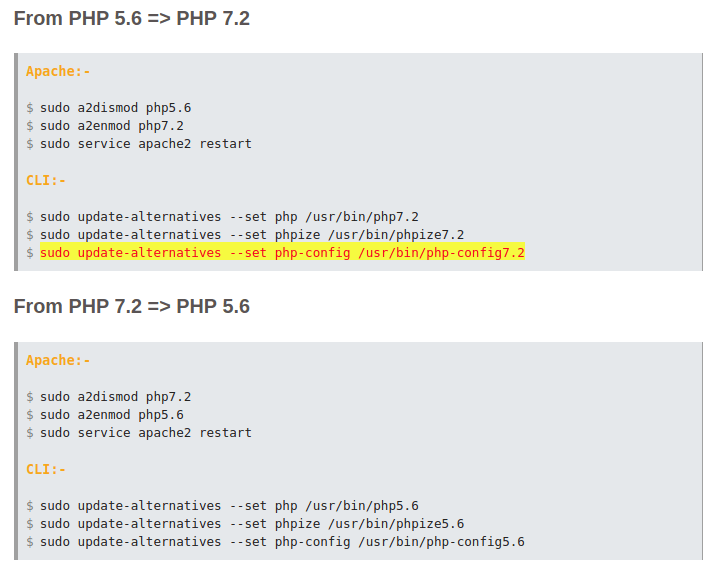
4. switch versi PHP =>https://tecadmin.net/install-php5-on-ubuntu/
Please write on a paper the following URL:
http://paste.ubuntu.com/p/bKmcQgxj7W/
In case you still experience boot problem, indicate this URL to:
boot.repair@gmail.com or to your favorite support forum.
You can now reboot your computer.
The boot files of [Ubuntu 18.04 LTS] are far from the start of the disk. Your BIOS may not detect them. You may want to retry after creating a /boot partition (EXT4, >200MB, start of the disk). This can be performed via tools such as gParted. Then select this partition via the [Separate /boot partition:] option of [Boot Repair]. (https://help.ubuntu.com/community/BootPartition)
 My Note