
Switch Between Multiple PHP Versions
To check the default installed version of PHP, run:
$ php -v
PHP 7.2.7-0ubuntu0.18.04.2 (cli) (built: Jul 4 2018 16:55:24) ( NTS )
Copyright (c) 1997-2018 The PHP Group
Zend Engine v3.2.0, Copyright (c) 1998-2018 Zend Technologies
with Zend OPcache v7.2.7-0ubuntu0.18.04.2, Copyright (c) 1999-2018, by Zend Technologies
As you can see, the installed version of PHP is 7.2.7. After testing your application for couple days, you find out that your application doesn’t support PHP7.2. In such cases, it is a good idea to have both PHP5.x version and PHP7.x version, so that you can easily switch between to/from any supported version at any time.
You don’t need to remove PHP7.x or reinstall LAMP stack. You can use both PHP5.x and 7.x versions together.
I assume you didn’t uninstall php5.6 in your system yet. Just in case, you removed it already, you can install it again using a PPA like below.
You can install PHP5.6 from a PPA:
$ sudo add-apt-repository -y ppa:ondrej/php
$ sudo apt update
$ sudo apt install php5.6
Switch from PHP7.x to PHP5.x
First disable PHP7.2 module using command:
$ sudo a2dismod php7.2
Module php7.2 disabled.
To activate the new configuration, you need to run:
systemctl restart apache2
Next, enable PHP5.6 module:
$ sudo a2enmod php5.6
Set PHP5.6 as default version:
sudo update-alternatives –set php /usr/bin/php5.6
Alternatively, you can run the following command to set which system wide version of PHP you want to use by default.
$ sudo update-alternatives –config php
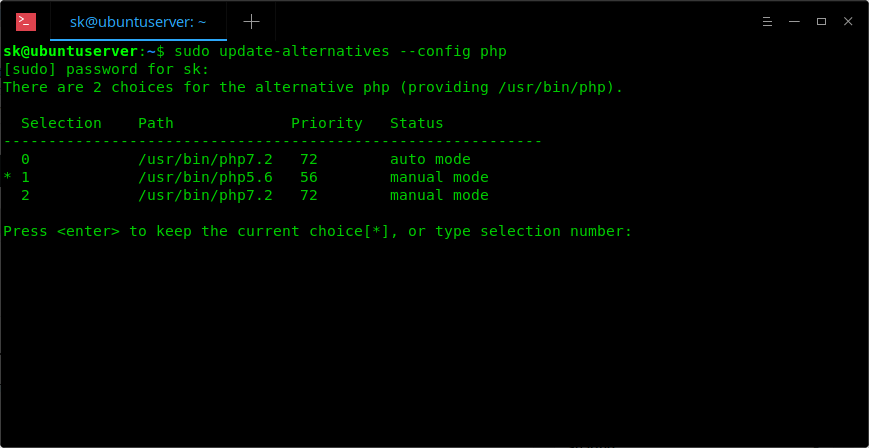
Enter the selection number to set it as default version or simply press ENTER to keep the current choice.
In case, you have installed other PHP extensions, set them as default as well.
$ sudo update-alternatives –set phar /usr/bin/phar5.6
Finally, restart your Apache web server:
$ sudo systemctl restart apache2
Now, check if PHP5.6 is the default version or not:
$ php -v
PHP 5.6.37-1+ubuntu18.04.1+deb.sury.org+1 (cli)
Copyright (c) 1997-2016 The PHP Group
Zend Engine v2.6.0, Copyright (c) 1998-2016 Zend Technologies
with Zend OPcache v7.0.6-dev, Copyright (c) 1999-2016, by Zend Technologies
Switch from PHP5.x to PHP7.x
$ sudo a2enmod php7.2
$ sudo a2dismod php5.6
$ sudo update-alternatives –set php /usr/bin/php7.2
$ sudo systemctl restart apache2
Source : https://www.ostechnix.com/how-to-switch-between-multiple-php-versions-in-ubuntu/
 My Note